FOCUS: Career & Major Exploration Tool
FOCUS 2 Career is an online tool that helps you learn about yourself by looking at your interests, values, skills, and personality. It matches you with careers and majors that fit you. FOCUS 2 is helpful whether you’re exploring options, thinking about changing your major, or ready to choose a career.
Prefer to learn by watching a video? Check out this short Focus 2 walkthrough video to see how the tool works before you get started.
Step-by-step instructions are also provided below.
A Note About Self-Assessments:
Self-assessments are meant to be a starting point for exploration, not a decision-maker. Your results are not meant to box you into certain majors or careers, and you do not have to agree with everything an assessment suggests.
Instead, think of Focus 2 as a structured way to reflect on questions related to your career identity, learn more about yourself, and explore what is out there in the job market. Your results can give you ideas to consider, questions to ask, and options to investigate further.
When you meet with a career consultant for a Focus 2 discussion appointment, we can talk through your results together, identify what feels accurate or useful to you, and think critically about how the information can support your career exploration. Ultimately, you are the one making the decisions about your major, career, and next steps. The assessment is simply one tool that can help you along the way.
Who Should Use it:
This resource is ideal for undergraduate students, graduate students, and alumni who are deciding on a college major, exploring prospective career paths, or seeking a deeper understanding of their workplace strengths. Whether you are an undeclared student mapping out academic majors or an upperclassman aligning your skills and values with specific industries, Focus 2 provides customized occupational matches tied directly to Binghamton’s areas of study.
How to Use it:
- Follow the Instructions Listed Below: The provided steps guide you on how to make your free account, as well as what parts to complete and what to do after finishing everything.
Why it’s Helpful:
Uncovering the right academic and career path starts with understanding your unique personal profile. Focus 2 translates your personal interests, skills, and work values into actionable career options. Taking the assessment gives students clear direction, bridges major choices with market opportunities, and serves as a foundation for personalized career coaching.
How to Access the FOCUS 2 Assessment:
New Users:
- Create a FOCUS 2 Account using your @binghamton.edu email address for your username and “BUBearcat” as your access code on the FOCUS 2 website.
Returning Users:
How to Take Your Focus 2 Assessment:
Start by completing the components in each of the three main categories:
- Career Planning Foundations
- Self-Assessment
- Explore the Possibilities
Be sure to save at least five careers and provide your feedback by commenting and rating each profession. There are two main ways to do so:
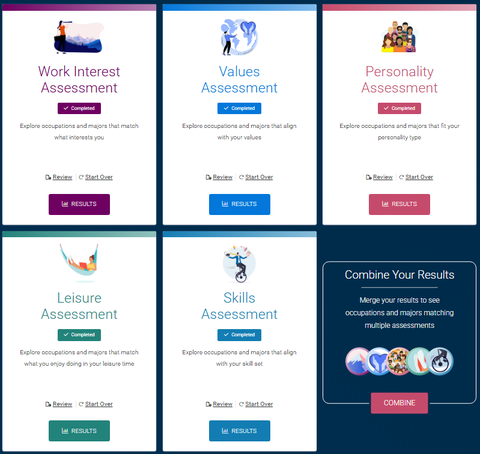
- While Reviewing Your Results: After completing each of the five mini-assessments, you will see a list of careers that are individually hyperlinked. Clicking on a career will take you to a detailed page about the position. At the top of the page, click the heart icon to comment on, rate, and save the career.
- Using the “Explore the Possibilities” Tool: This tool provides various lists of careers, also hyperlinked, allowing you to comment on, rate, and save each position.
After Taking the Assessment:
Schedule a “Focus 2 Discussion” appointment via hireBING to review your results with a Career Consultant. To schedule an appointment:
- Log in to your hireBING account and complete your profile.
- Click on “Appointments” in the left navigation.
- Choose “Focus 2 Discussion” as your appointment type.
- Follow the prompts to select your preferred appointment date, time, and staff member from the list provided.
For any questions, reach out to careers@binghamton.edu.
External websites may not fully comply with accessibility standards, and we cannot guarantee the accessibility of content outside the University. Please email careers@binghamton.edu if you encounter significant accessibility issues on these sites.
Photo Source: Thumbnail image made with Chat GPT
